
Mobile site
1xBet Malaysia Mobile Site: Bet Without an App
The 1xBet mobile site lets you bet from any phone browser without installing an app. This guide shows how to open it, add it to your Home Screen, use the main features and decide whether the app suits you better.
- No download needed
- Works in any phone browser
- Full cashier in MYR
Add to Home Screen
- Open 1xBet in Chrome or Safari
- Tap the menu or Share icon
- Choose “Add to Home Screen”
Opens full screen, updates by itself.
On this page
- What the 1xBet Mobile Site Is
- How to Open 1xBet in Your Phone Browser
- Add 1xBet to Your Home Screen
- Features in the Browser Version
- Mobile Site vs App
- Deposits and Withdrawals on Your Phone
- Tips for Betting in Your Browser
- Data Use and Speed
- Mobile Site vs Desktop
- Fixing Common Browser Problems
- 1xBet Mobile Site FAQ
What the 1xBet Mobile Site Is
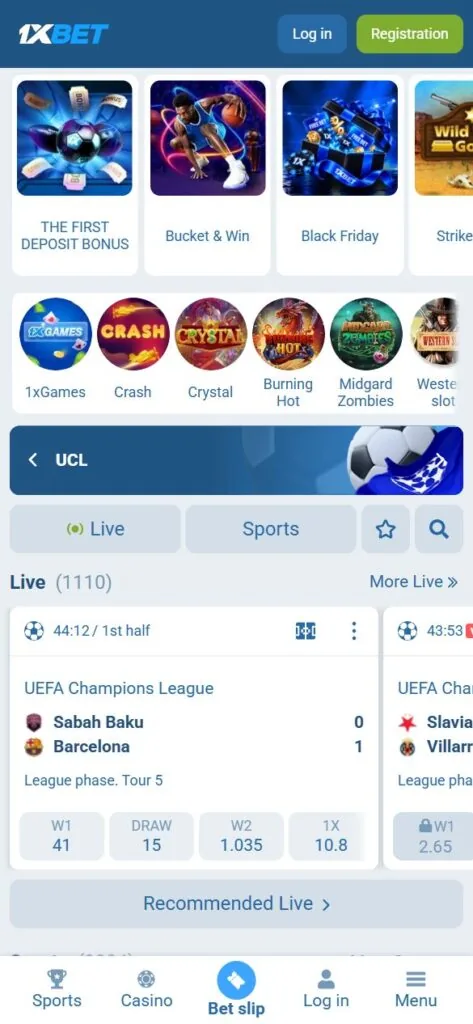
The mobile site is the 1xBet website adapted for small screens. It opens automatically when you visit 1xBet from a phone. You use the same account, balance and bonuses as in the app and on desktop.
| Detail | Value |
|---|---|
| Install | Not needed |
| Works on | Android, iPhone, iPad and most other phones |
| Browsers | Chrome, Safari, Samsung Internet and other modern browsers |
| Updates | Automatic, every time the page loads |
| Currency | MYR |
| Features | Sportsbook, live betting, casino, cashier, support chat |
How to Open 1xBet in Your Phone Browser
- Open your phone browser.
- Go to 1xBet through the button on this page.
- Log in or tap “Registration” to create an account.
- Choose MYR as the currency if you are new.
The layout adjusts to your screen. Menus move to the bottom bar, and the bet slip opens as a panel over the page.
Add 1xBet to Your Home Screen
A shortcut opens the site in one tap, like an app.
On Android (Chrome):
- Open 1xBet in Chrome.
- Tap the three-dot menu.
- Choose “Add to Home screen” and confirm.
On iPhone (Safari):
- Open 1xBet in Safari.
- Tap the Share icon.
- Choose “Add to Home Screen” and tap “Add”.
Features in the Browser Version
Everything from the desktop version is available on the phone:
- Pre-match and live betting on football, badminton, esports and more.
- Live statistics and, for selected events, live streams.
- Cash out on many pre-match and live bets.
- Slots, live casino tables and 1xGames.
- Deposits and withdrawals in MYR, including crypto.
- Bonus balance, wagering progress and bet history.
- Live chat with support.
Your welcome bonus and the promo code work the same way as on desktop.

Mobile Site vs App
| Feature | Mobile site | Android APK | iOS app |
|---|---|---|---|
| Install | No | Yes, about 150 MB | From the App Store, where available |
| Speed | Depends on the browser | Fast | Fast |
| Push notifications | No | Yes | Yes |
| Updates | Automatic | Manual, through a new APK | Through the App Store |
| Storage use | Almost none | High | Medium |
Choose the browser version if you bet now and then, have an older phone or little free storage. Choose an app if you bet every day or want notifications. Install guides: Android APK and iOS app.

Deposits and Withdrawals on Your Phone
The cashier on your phone matches the desktop one. Open “Deposit”, choose a method, enter the amount in MYR and confirm in your bank, eWallet or crypto wallet. Deposits start at MYR 5 with Touch ‘n Go or GrabPay. Withdrawals need a verified account. Full details are on our payments page.
Tips for Betting in Your Browser
- Keep your browser up to date for faster loading and better security.
- Connect to Wi-Fi before you watch live streams; video uses more data.
- Turn off battery saver during live betting, so the page does not pause.
- Log out on shared phones and do not save the password in the browser.
- Clear the browser cache if pages load slowly or show old odds.
Data Use and Speed
The browser version loads only the pages you open, so it uses little storage. Data use depends on what you do:
| Activity | Data use |
|---|---|
| Browsing odds and placing bets | Low |
| Live betting with statistics | Medium |
| Slots | Medium |
| Live streams and live casino | High |
On a limited mobile plan, watch streams on Wi-Fi only. If pages feel slow, close other browser tabs and turn off data saver for the site, because it can delay odds updates.
Mobile Site vs Desktop
The phone version keeps everything from the desktop site but arranges it for one hand:
| Feature | Phone browser | Desktop |
|---|---|---|
| Navigation | Bottom bar and side menu | Top menu and left sports list |
| Bet slip | Slides up from the bottom | Fixed panel on the right |
| Live streams | Full width, upright or sideways | Next to the bet slip |
| Cashier | Touch ‘n Go, GrabPay, DuitNow QR, online banking, crypto | Same methods |
| Multi-LIVE | Fewer matches on screen | Several matches side by side |
If you bet on two or three matches at once, a tablet turned sideways gives a view close to desktop.
Fixing Common Browser Problems
| Problem | Likely cause | What to do |
|---|---|---|
| Site does not open | Network block or weak signal | Switch between Wi-Fi and mobile data; try the app |
| Page loads slowly | Old cache or weak signal | Clear the browser cache; move to a stronger connection |
| Bet slip does not confirm | Odds changed | Accept the new odds or remove the selection |
| Logged out often | Browser clears cookies | Allow cookies for the site in browser settings |
1xBet Mobile Site FAQ
18+ only. Gambling involves financial risk and can be addictive. Bet responsibly and only with money you can afford to lose.